
水冷、工藝、效能三位一體好讀版
http://www.xfastest.com/forum.php?mod=viewthread&tid=96693&fromuid=38227
==============================================================================
今年美國CES消費性電子展剛結束不久,
相信不少效能狂熱玩家對於華碩新推出的頂級顯示卡還記憶猶新。
ROG ARES II 限定版搭載兩顆AMD Radeon HD 7970 GHz Edition GPU,
配置 6GB GDDR5 視訊記憶體,採用獨家20相 Super Alloy Power 超合金元件供電,
以及全新混合式散熱設計,透過水冷配備快速冷卻GPU,
並有防塵風扇降低整體供電模組和記憶體溫度,達到最佳穩定性。
這次搶先為大家帶來第一手正式發售版本的用料介紹以及性能測試,趕緊來看看吧!
包裝與配件
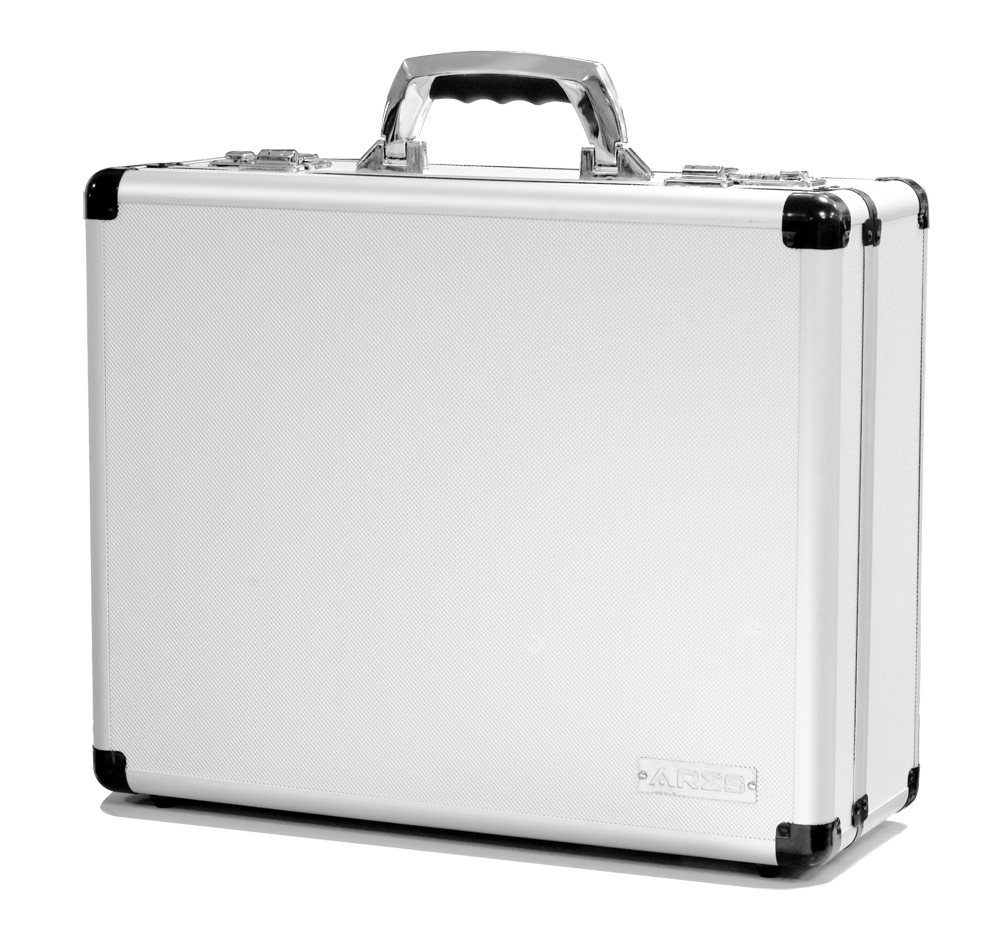
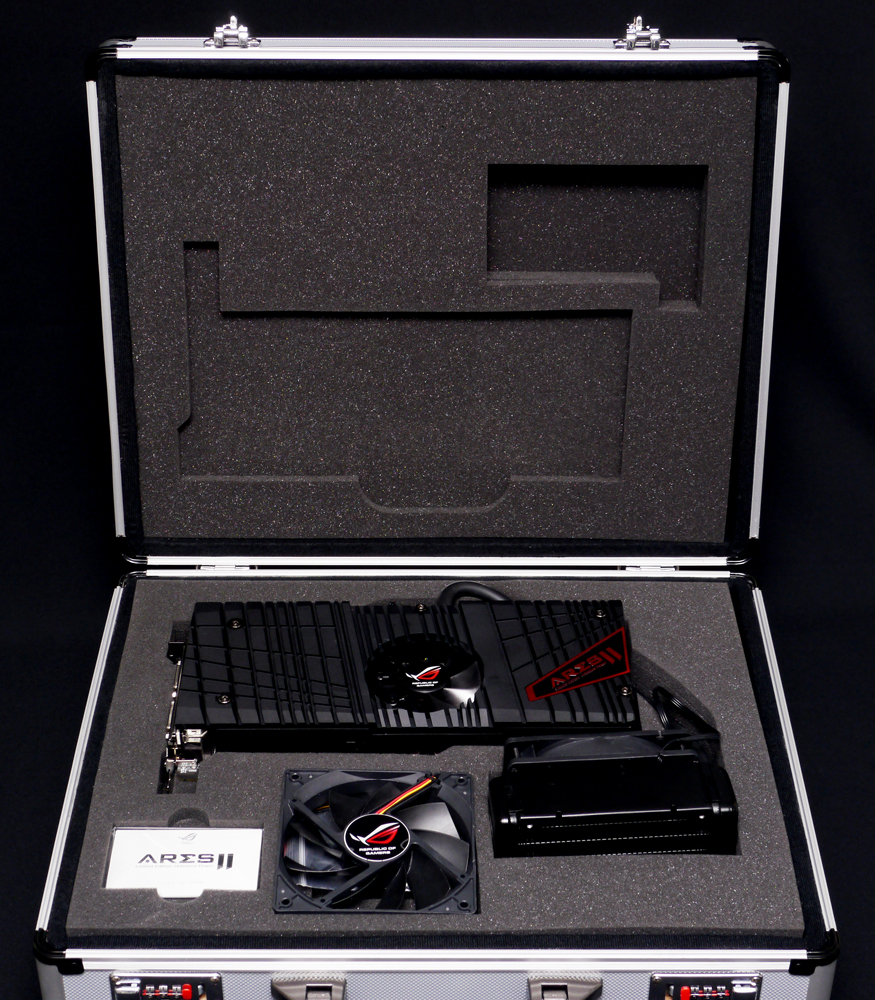
頂級顯卡就是要與眾不同,ARES II 提供一個金屬外殼的手提箱,還加上了兩組密碼鎖,
玩家開箱起來更有感覺
http://picx.xfastest.com/elvis/Graphic/ASUS/ARES2-6GD5/01.jpg
 http://picx.xfastest.com/elvis/Graphic/ASUS/ARES2-6GD5/02.jpg
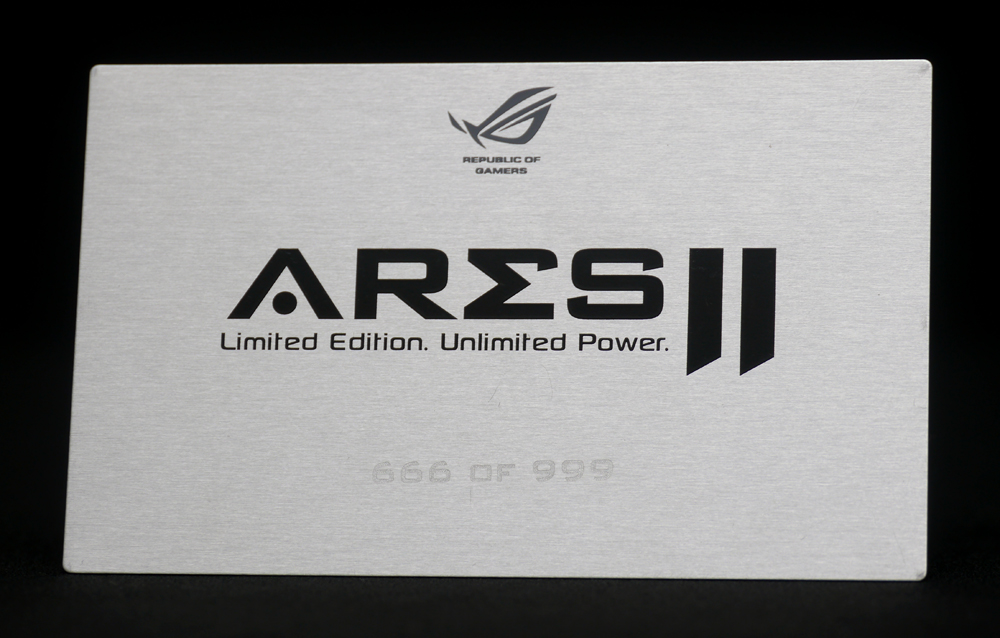
ARES II 只限量製作999張,這次入手的是666號,這對即將要過年的華人來說還挺吉利的
http://picx.xfastest.com/elvis/Graphic/ASUS/ARES2-6GD5/03.jpg
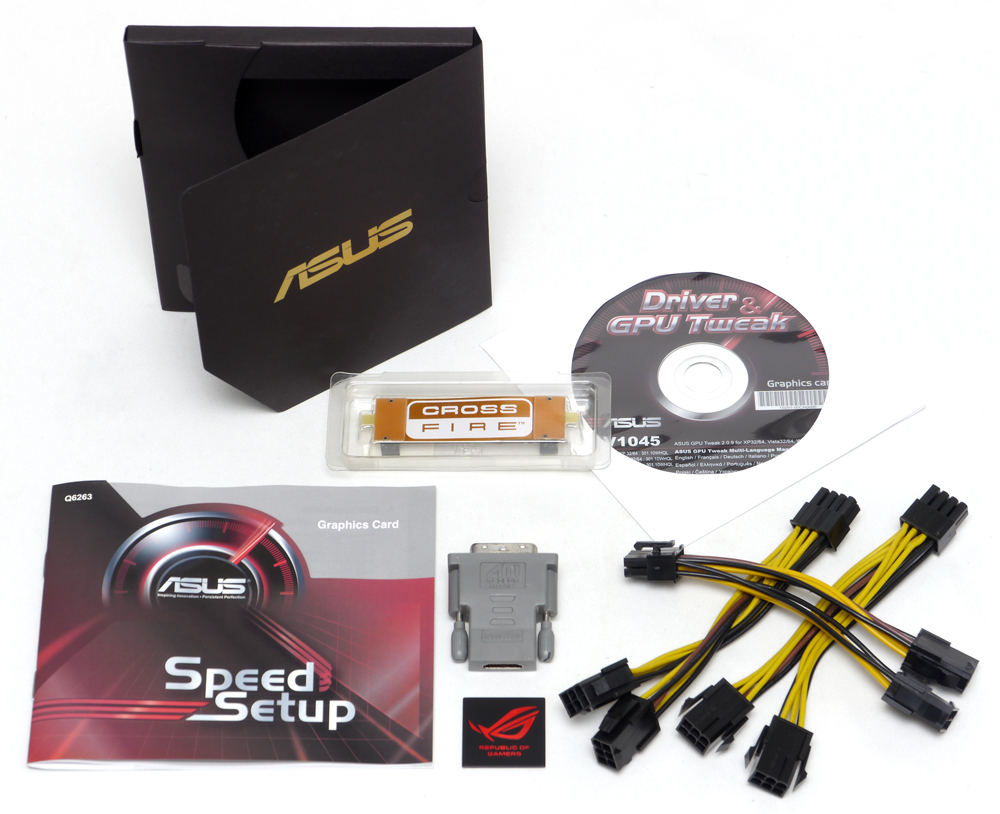
配件附上了3條雙6pin轉8pin的電源線、DVI-I轉D-Sub轉接頭、CrossFireX橋接線、
ROG Logo 金屬銘牌、說明書和驅動軟體光碟
http://picx.xfastest.com/elvis/Graphic/ASUS/ARES2-6GD5/06.jpg
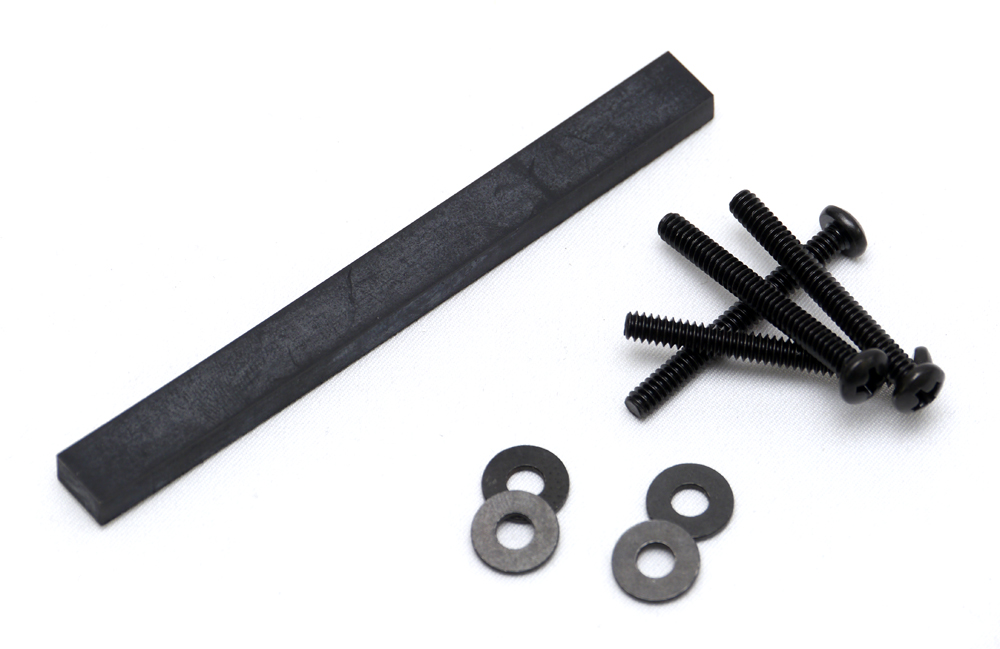
卡身與水冷散熱器固定用零件,長條狀的橡膠墊片是裝機時用來墊在卡身與主機板之間,
避免長時間使用造成板彎
http://picx.xfastest.com/elvis/Graphic/ASUS/ARES2-6GD5/05.jpg
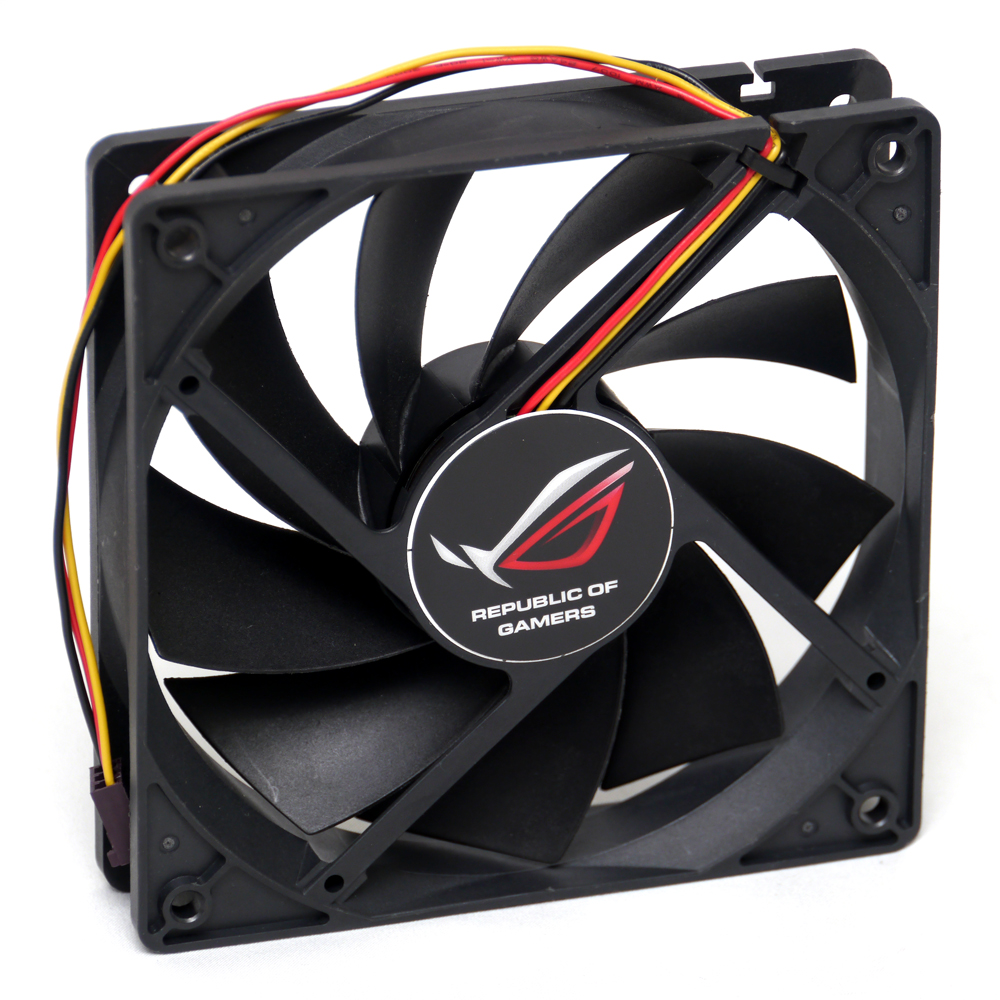
除了水冷散熱排上已經附上的風扇,還多了一顆可以加裝的風扇
http://picx.xfastest.com/elvis/Graphic/ASUS/ARES2-6GD5/04.jpg
外觀與散熱
與水冷散熱排相連的 ARES II
http://picx.xfastest.com/elvis/Graphic/ASUS/ARES2-6GD5/07.jpg

顯卡本體,比標準的顯示卡還要在高一節,表面為磨砂觸感
http://picx.xfastest.com/elvis/Graphic/ASUS/ARES2-6GD5/08.jpg

ARES II 銘牌
http://picx.xfastest.com/elvis/Graphic/ASUS/ARES2-6GD5/11.jpg

視訊輸出介面有4組 DisplayPort 1.2 和2組 DVI-I Dual Link,
散熱器只比標準 2 Slot 略為厚上一些些
http://picx.xfastest.com/elvis/Graphic/ASUS/ARES2-6GD5/09.jpg

顯卡頂部可見ROG和ARES專屬Logo,電源部分須使用3組 PCI-E 8 pin 輸入
http://picx.xfastest.com/elvis/Graphic/ASUS/ARES2-6GD5/10.jpg

顯卡背面則覆上了鋁質的散熱背板
http://picx.xfastest.com/elvis/Graphic/ASUS/ARES2-6GD5/12.jpg

水冷散熱排本體,使用12公分9鐮葉的風扇作為散熱動力
http://picx.xfastest.com/elvis/Graphic/ASUS/ARES2-6GD5/13.jpg
 http://picx.xfastest.com/elvis/Graphic/ASUS/ARES2-6GD5/14.jpg
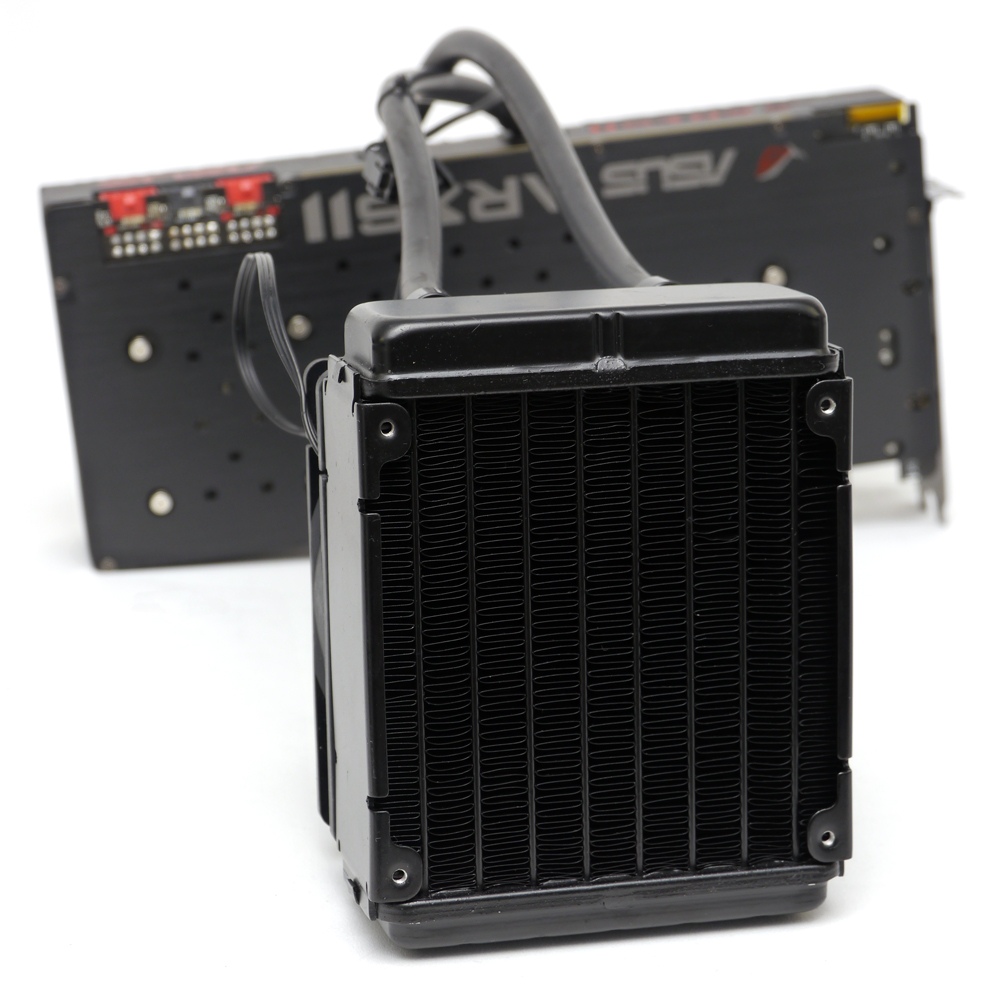
由標籤上得知此款水冷散熱器由知名製造商Asetek所代工
http://picx.xfastest.com/elvis/Graphic/ASUS/ARES2-6GD5/15.jpg

把導風蓋板打開來看看
http://picx.xfastest.com/elvis/Graphic/ASUS/ARES2-6GD5/16.jpg

蓋板採用鋁擠式一體成形,看起來造價不斐呀
http://picx.xfastest.com/elvis/Graphic/ASUS/ARES2-6GD5/17.jpg

卸除蓋板後可以見到兩組水冷頭,中央的風扇僅針對供電元件與記憶體顆粒進行散熱
http://picx.xfastest.com/elvis/Graphic/ASUS/ARES2-6GD5/18.jpg
 http://picx.xfastest.com/elvis/Graphic/ASUS/ARES2-6GD5/19.jpg

為了因應 AMD Radeon HD 7970 GPU晶片上Die的形式,
水冷頭接觸面特別做出相對應的造型,不過表面沒有特殊鏡面拋光
http://picx.xfastest.com/elvis/Graphic/ASUS/ARES2-6GD5/20.jpg
 http://picx.xfastest.com/elvis/Graphic/ASUS/ARES2-6GD5/21.jpg

身兼支架功能的鋁質散熱框架
http://picx.xfastest.com/elvis/Graphic/ASUS/ARES2-6GD5/22.jpg

散熱背板除了與視訊記憶體接觸部分有貼上散熱膠布之外,
其餘部分皆有貼上絕緣塑膠墊片避免與PCB接觸而短路
http://picx.xfastest.com/elvis/Graphic/ASUS/ARES2-6GD5/24.jpg

用料細節
PCB上可見滿滿的料件
http://picx.xfastest.com/elvis/Graphic/ASUS/ARES2-6GD5/25.jpg

兩顆 AMD Radeon HD 7970 GHz Edition GPU,
使用支援 PCI-E Gen3 頻寬的 PLX PEX8747 晶片進行串聯,
記憶體則用上了 hynix H5GQ2H24AFR-R0C 2Gb GDDR5顆粒,
每個GPU週圍的正反兩面各有6片記憶體顆粒,
因此單一GPU即擁有3GB的記憶體,兩顆串聯就有6GB的容量囉~
http://picx.xfastest.com/elvis/Graphic/ASUS/ARES2-6GD5/26.jpg
 http://picx.xfastest.com/elvis/Graphic/ASUS/ARES2-6GD5/27.jpg

供電部分採用 Super Alloy Power 超合金元件供電,可承受更大的電壓和溫度,
相較於一般顯卡卡,使用壽命延長2.5倍。
http://picx.xfastest.com/elvis/Graphic/ASUS/ARES2-6GD5/28.jpg
 每個GPU各自擁有獨立的8相供電和2相記憶體供電,總合起來就有20相供電
由於本卡已經使用兩顆 AMD Radeon HD 7970 GHz Edition GPU,
所以留有一組CrossFireX接頭,可以再串接一張 ARES II 顯卡,旁邊可見BIOS切換器
http://picx.xfastest.com/elvis/Graphic/ASUS/ARES2-6GD5/29.jpg

視訊接頭內部也使用金屬殼保護,減少訊號干擾
http://picx.xfastest.com/elvis/Graphic/ASUS/ARES2-6GD5/30.jpg

PCB背面的用料也是超豪華
http://picx.xfastest.com/elvis/Graphic/ASUS/ARES2-6GD5/31.jpg

上機實測
測試平台與環境
CPU: Intel Core i7-3770K @ 4.8GHz
Cooler: Antec KUHLER H2O 920 改2D冷排
Thermal Compound: Antec Formula 7
MB: ASUS ROG Maximus V Formula
RAM: Avexir Core DDR3-2400 4GB*4
Graphic: ASUS ROG ARES II
Storage: OCZ Vector SSD 256GB
PSU: Antec HCP-1200W
Chassis: Lubic Open Paltform 3
Monitor: Dell U2410
OS: Windows 7 64 Bit
室溫22?C,相對濕度66%
顯卡頂部的 ARES II 字樣會發出紅光
http://picx.xfastest.com/elvis/Graphic/ASUS/ARES2-6GD5/32.jpg

華碩近期的顯示卡產品都設計有PCI-E電源接線指示,ARES II 當然也不例外
http://picx.xfastest.com/elvis/Graphic/ASUS/ARES2-6GD5/33.jpg

GPU-Z資訊
http://picx.xfastest.com/elvis/Graphic/ASUS/ARES2-6GD5/GPU-Z.png
 核心時脈1.1GHz,記憶體有效時脈為6.6GHz,
本次使用AMD最新的 Catalyst 13.1 版驅動
獨家 GPU Tweaker 調校軟體
http://picx.xfastest.com/elvis/Graphic/ASUS/ARES2-6GD5/GPU-Tweaker.png
 最新版的 GPU Tweaker 可調整時脈、電壓、供電等細項,
並可監視GPU負載、記憶體負載、溫度與風扇概況,還有特製的GPU-Z面板
效能概況
3DMark06 (DirectX 9)
http://picx.xfastest.com/elvis/Graphic/ASUS/ARES2-6GD5/3DMark06.png

3DMark Vantage Performance (DirectX 10)
http://picx.xfastest.com/elvis/Graphic/ASUS/ARES2-6GD5/3DMarkVantageP.png

3DMark Vantage Extreme (DirectX 10)
http://picx.xfastest.com/elvis/Graphic/ASUS/ARES2-6GD5/3DMarkVantageX.png

3DMark11 Performance (DirectX 11)
http://picx.xfastest.com/elvis/Graphic/ASUS/ARES2-6GD5/3DMark11P.png

3DMark11 Extreme (DirectX 11)
http://picx.xfastest.com/elvis/Graphic/ASUS/ARES2-6GD5/3DMark11X.png

Street Fighter IV / 快打旋風 4 (DirectX 9, 1920x1200, 16xQ CSAA, 特效全開)
http://picx.xfastest.com/elvis/Graphic/ASUS/ARES2-6GD5/StreetFighterIV.png

Super Street Fighter IV - Arcade Edition / 超級快打旋風 4 - 街機版
(DirectX 9, 1920x1200, 16xQ CSAA, 特效全開)
http://picx.xfastest.com/elvis/Graphic/ASUS/ARES2-6GD5/SSFIV.png

Street Fighter X Tekken / 快打旋風 X 鐵拳
(DirectX 9, 1920x1200, 16xQ CSAA, 特效全開)
http://picx.xfastest.com/elvis/Graphic/ASUS/ARES2-6GD5/SFTK.png

Resident Evil 5 / 惡靈古堡 5 (DirectX 10, 1920x1200, 8x MSAA, 特效全開)
http://picx.xfastest.com/elvis/Graphic/ASUS/ARES2-6GD5/RE5.png

DiRT 3 / 越野精英賽:大地長征 3 (DirectX 11, 1920x1200, 8x MSAA, 特效全開)
http://picx.xfastest.com/elvis/Graphic/ASUS/ARES2-6GD5/DiRT3.png

DiRT Showdown / 越野精英賽:一決高下 (DirectX 11, 1920x1200, 8x MSAA, 特效全開)
http://picx.xfastest.com/elvis/Graphic/ASUS/ARES2-6GD5/DiRT-Showdown.png

F1 2012 (DirectX 11, 1920x1200, 8x MSAA, 特效全開)
http://picx.xfastest.com/elvis/Graphic/ASUS/ARES2-6GD5/F1-2012.png

Lost Planet 2 / 失落的星球 2 (DirectX 11, 1920x1200, 8x MSAA, 特效全開)
http://picx.xfastest.com/elvis/Graphic/ASUS/ARES2-6GD5/LP2.png

Crysis 2 / 末日之戰 2 (DirectX 9/11, 1920x1200, 4x MSAA, 特效全開)
http://picx.xfastest.com/elvis/Graphic/ASUS/ARES2-6GD5/Crysis2.png

使用FurMark燒機5分鐘,最高溫來到66?C,整機最大耗電量來到576W
http://picx.xfastest.com/elvis/Graphic/ASUS/ARES2-6GD5/FurMark.png
 http://picx.xfastest.com/elvis/Graphic/ASUS/ARES2-6GD5/Power.jpg

性能比較與總結
http://picx.xfastest.com/elvis/Graphic/ASUS/ARES2-6GD5/3DMark.png
 http://picx.xfastest.com/elvis/Graphic/ASUS/ARES2-6GD5/CrossFire.png

其實這張 ARES II 就相當於華碩先前推出 Matrix HD 7970 的雙卡CrossFireX合體版,
相較於標準的 AMD Radeon HD 7970 GHz Edition 還向上超頻了一個幅度。
由於近期驅動的優化,ARES II 在遊戲上的表現幾乎兩倍於 Matrix HD 7970,
另一方面也完勝 NVIDIA GeForce GTX 690,可見其性能相當剽悍。
工藝與散熱設計方面,ARES II 結合一體式水冷又是另一項創舉,
ARES II 的水冷設計不僅能降低噪音,更可有效縮減本體散熱器厚度。
從燒機測試我們也發現,雖然散熱器在兩顆GPU上以串接的方式僅使用一組散熱排,
但溫度壓制效果仍然相當優異。
綜合來說,ASUS ROG ARES II 達成水冷、工藝、效能三位一體,
是頂級顯示卡的新里程碑。目前建議售價為NT$54990,並且只限量發行999張,
想要搶購的狂熱玩家可得加緊腳步了!
--
--
http://www.xfastest.com/forum.php?mod=viewthread&tid=96693&fromuid=38227
==============================================================================
今年美國CES消費性電子展剛結束不久,
相信不少效能狂熱玩家對於華碩新推出的頂級顯示卡還記憶猶新。
ROG ARES II 限定版搭載兩顆AMD Radeon HD 7970 GHz Edition GPU,
配置 6GB GDDR5 視訊記憶體,採用獨家20相 Super Alloy Power 超合金元件供電,
以及全新混合式散熱設計,透過水冷配備快速冷卻GPU,
並有防塵風扇降低整體供電模組和記憶體溫度,達到最佳穩定性。
這次搶先為大家帶來第一手正式發售版本的用料介紹以及性能測試,趕緊來看看吧!
包裝與配件
頂級顯卡就是要與眾不同,ARES II 提供一個金屬外殼的手提箱,還加上了兩組密碼鎖,
玩家開箱起來更有感覺
http://picx.xfastest.com/elvis/Graphic/ASUS/ARES2-6GD5/01.jpg
ARES II 只限量製作999張,這次入手的是666號,這對即將要過年的華人來說還挺吉利的
http://picx.xfastest.com/elvis/Graphic/ASUS/ARES2-6GD5/03.jpg
配件附上了3條雙6pin轉8pin的電源線、DVI-I轉D-Sub轉接頭、CrossFireX橋接線、
ROG Logo 金屬銘牌、說明書和驅動軟體光碟
http://picx.xfastest.com/elvis/Graphic/ASUS/ARES2-6GD5/06.jpg
卡身與水冷散熱器固定用零件,長條狀的橡膠墊片是裝機時用來墊在卡身與主機板之間,
避免長時間使用造成板彎
http://picx.xfastest.com/elvis/Graphic/ASUS/ARES2-6GD5/05.jpg
除了水冷散熱排上已經附上的風扇,還多了一顆可以加裝的風扇
http://picx.xfastest.com/elvis/Graphic/ASUS/ARES2-6GD5/04.jpg
外觀與散熱
與水冷散熱排相連的 ARES II
http://picx.xfastest.com/elvis/Graphic/ASUS/ARES2-6GD5/07.jpg
顯卡本體,比標準的顯示卡還要在高一節,表面為磨砂觸感
http://picx.xfastest.com/elvis/Graphic/ASUS/ARES2-6GD5/08.jpg
ARES II 銘牌
http://picx.xfastest.com/elvis/Graphic/ASUS/ARES2-6GD5/11.jpg
視訊輸出介面有4組 DisplayPort 1.2 和2組 DVI-I Dual Link,
散熱器只比標準 2 Slot 略為厚上一些些
http://picx.xfastest.com/elvis/Graphic/ASUS/ARES2-6GD5/09.jpg
顯卡頂部可見ROG和ARES專屬Logo,電源部分須使用3組 PCI-E 8 pin 輸入
http://picx.xfastest.com/elvis/Graphic/ASUS/ARES2-6GD5/10.jpg
顯卡背面則覆上了鋁質的散熱背板
http://picx.xfastest.com/elvis/Graphic/ASUS/ARES2-6GD5/12.jpg
水冷散熱排本體,使用12公分9鐮葉的風扇作為散熱動力
http://picx.xfastest.com/elvis/Graphic/ASUS/ARES2-6GD5/13.jpg
由標籤上得知此款水冷散熱器由知名製造商Asetek所代工
http://picx.xfastest.com/elvis/Graphic/ASUS/ARES2-6GD5/15.jpg
把導風蓋板打開來看看
http://picx.xfastest.com/elvis/Graphic/ASUS/ARES2-6GD5/16.jpg
蓋板採用鋁擠式一體成形,看起來造價不斐呀
http://picx.xfastest.com/elvis/Graphic/ASUS/ARES2-6GD5/17.jpg
卸除蓋板後可以見到兩組水冷頭,中央的風扇僅針對供電元件與記憶體顆粒進行散熱
http://picx.xfastest.com/elvis/Graphic/ASUS/ARES2-6GD5/18.jpg
為了因應 AMD Radeon HD 7970 GPU晶片上Die的形式,
水冷頭接觸面特別做出相對應的造型,不過表面沒有特殊鏡面拋光
http://picx.xfastest.com/elvis/Graphic/ASUS/ARES2-6GD5/20.jpg
身兼支架功能的鋁質散熱框架
http://picx.xfastest.com/elvis/Graphic/ASUS/ARES2-6GD5/22.jpg
散熱背板除了與視訊記憶體接觸部分有貼上散熱膠布之外,
其餘部分皆有貼上絕緣塑膠墊片避免與PCB接觸而短路
http://picx.xfastest.com/elvis/Graphic/ASUS/ARES2-6GD5/24.jpg
用料細節
PCB上可見滿滿的料件
http://picx.xfastest.com/elvis/Graphic/ASUS/ARES2-6GD5/25.jpg
兩顆 AMD Radeon HD 7970 GHz Edition GPU,
使用支援 PCI-E Gen3 頻寬的 PLX PEX8747 晶片進行串聯,
記憶體則用上了 hynix H5GQ2H24AFR-R0C 2Gb GDDR5顆粒,
每個GPU週圍的正反兩面各有6片記憶體顆粒,
因此單一GPU即擁有3GB的記憶體,兩顆串聯就有6GB的容量囉~
http://picx.xfastest.com/elvis/Graphic/ASUS/ARES2-6GD5/26.jpg
供電部分採用 Super Alloy Power 超合金元件供電,可承受更大的電壓和溫度,
相較於一般顯卡卡,使用壽命延長2.5倍。
http://picx.xfastest.com/elvis/Graphic/ASUS/ARES2-6GD5/28.jpg
由於本卡已經使用兩顆 AMD Radeon HD 7970 GHz Edition GPU,
所以留有一組CrossFireX接頭,可以再串接一張 ARES II 顯卡,旁邊可見BIOS切換器
http://picx.xfastest.com/elvis/Graphic/ASUS/ARES2-6GD5/29.jpg
視訊接頭內部也使用金屬殼保護,減少訊號干擾
http://picx.xfastest.com/elvis/Graphic/ASUS/ARES2-6GD5/30.jpg
PCB背面的用料也是超豪華
http://picx.xfastest.com/elvis/Graphic/ASUS/ARES2-6GD5/31.jpg
上機實測
測試平台與環境
CPU: Intel Core i7-3770K @ 4.8GHz
Cooler: Antec KUHLER H2O 920 改2D冷排
Thermal Compound: Antec Formula 7
MB: ASUS ROG Maximus V Formula
RAM: Avexir Core DDR3-2400 4GB*4
Graphic: ASUS ROG ARES II
Storage: OCZ Vector SSD 256GB
PSU: Antec HCP-1200W
Chassis: Lubic Open Paltform 3
Monitor: Dell U2410
OS: Windows 7 64 Bit
室溫22?C,相對濕度66%
顯卡頂部的 ARES II 字樣會發出紅光
http://picx.xfastest.com/elvis/Graphic/ASUS/ARES2-6GD5/32.jpg
華碩近期的顯示卡產品都設計有PCI-E電源接線指示,ARES II 當然也不例外
http://picx.xfastest.com/elvis/Graphic/ASUS/ARES2-6GD5/33.jpg
GPU-Z資訊
http://picx.xfastest.com/elvis/Graphic/ASUS/ARES2-6GD5/GPU-Z.png
本次使用AMD最新的 Catalyst 13.1 版驅動
獨家 GPU Tweaker 調校軟體
http://picx.xfastest.com/elvis/Graphic/ASUS/ARES2-6GD5/GPU-Tweaker.png
並可監視GPU負載、記憶體負載、溫度與風扇概況,還有特製的GPU-Z面板
效能概況
3DMark06 (DirectX 9)
http://picx.xfastest.com/elvis/Graphic/ASUS/ARES2-6GD5/3DMark06.png
3DMark Vantage Performance (DirectX 10)
http://picx.xfastest.com/elvis/Graphic/ASUS/ARES2-6GD5/3DMarkVantageP.png
3DMark Vantage Extreme (DirectX 10)
http://picx.xfastest.com/elvis/Graphic/ASUS/ARES2-6GD5/3DMarkVantageX.png
3DMark11 Performance (DirectX 11)
http://picx.xfastest.com/elvis/Graphic/ASUS/ARES2-6GD5/3DMark11P.png
3DMark11 Extreme (DirectX 11)
http://picx.xfastest.com/elvis/Graphic/ASUS/ARES2-6GD5/3DMark11X.png
Street Fighter IV / 快打旋風 4 (DirectX 9, 1920x1200, 16xQ CSAA, 特效全開)
http://picx.xfastest.com/elvis/Graphic/ASUS/ARES2-6GD5/StreetFighterIV.png
Super Street Fighter IV - Arcade Edition / 超級快打旋風 4 - 街機版
(DirectX 9, 1920x1200, 16xQ CSAA, 特效全開)
http://picx.xfastest.com/elvis/Graphic/ASUS/ARES2-6GD5/SSFIV.png
Street Fighter X Tekken / 快打旋風 X 鐵拳
(DirectX 9, 1920x1200, 16xQ CSAA, 特效全開)
http://picx.xfastest.com/elvis/Graphic/ASUS/ARES2-6GD5/SFTK.png
Resident Evil 5 / 惡靈古堡 5 (DirectX 10, 1920x1200, 8x MSAA, 特效全開)
http://picx.xfastest.com/elvis/Graphic/ASUS/ARES2-6GD5/RE5.png
DiRT 3 / 越野精英賽:大地長征 3 (DirectX 11, 1920x1200, 8x MSAA, 特效全開)
http://picx.xfastest.com/elvis/Graphic/ASUS/ARES2-6GD5/DiRT3.png
DiRT Showdown / 越野精英賽:一決高下 (DirectX 11, 1920x1200, 8x MSAA, 特效全開)
http://picx.xfastest.com/elvis/Graphic/ASUS/ARES2-6GD5/DiRT-Showdown.png
F1 2012 (DirectX 11, 1920x1200, 8x MSAA, 特效全開)
http://picx.xfastest.com/elvis/Graphic/ASUS/ARES2-6GD5/F1-2012.png
Lost Planet 2 / 失落的星球 2 (DirectX 11, 1920x1200, 8x MSAA, 特效全開)
http://picx.xfastest.com/elvis/Graphic/ASUS/ARES2-6GD5/LP2.png
Crysis 2 / 末日之戰 2 (DirectX 9/11, 1920x1200, 4x MSAA, 特效全開)
http://picx.xfastest.com/elvis/Graphic/ASUS/ARES2-6GD5/Crysis2.png
使用FurMark燒機5分鐘,最高溫來到66?C,整機最大耗電量來到576W
http://picx.xfastest.com/elvis/Graphic/ASUS/ARES2-6GD5/FurMark.png
性能比較與總結
http://picx.xfastest.com/elvis/Graphic/ASUS/ARES2-6GD5/3DMark.png
其實這張 ARES II 就相當於華碩先前推出 Matrix HD 7970 的雙卡CrossFireX合體版,
相較於標準的 AMD Radeon HD 7970 GHz Edition 還向上超頻了一個幅度。
由於近期驅動的優化,ARES II 在遊戲上的表現幾乎兩倍於 Matrix HD 7970,
另一方面也完勝 NVIDIA GeForce GTX 690,可見其性能相當剽悍。
工藝與散熱設計方面,ARES II 結合一體式水冷又是另一項創舉,
ARES II 的水冷設計不僅能降低噪音,更可有效縮減本體散熱器厚度。
從燒機測試我們也發現,雖然散熱器在兩顆GPU上以串接的方式僅使用一組散熱排,
但溫度壓制效果仍然相當優異。
綜合來說,ASUS ROG ARES II 達成水冷、工藝、效能三位一體,
是頂級顯示卡的新里程碑。目前建議售價為NT$54990,並且只限量發行999張,
想要搶購的狂熱玩家可得加緊腳步了!
--
推 x86t:可惡 沒錢08/10 19:09
--
All Comments