
※ [本文轉錄自 PC_Shopping 看板 #1EOnOSVF ]
作者: ChangElvis (羽神翼) 站內: PC_Shopping
標題: [開箱] Super Talent Express RC8 USB 3.0隨身碟
時間: Sun Sep 4 14:09:25 2011
加掛Turbo力拼SSD好讀版
http://www.xfastest.com/viewthread.php?tid=65146&fromuid=38227
==============================================================================
USB 3.0介面的隨身碟越來越多,傳輸速度也越來越快,
記憶體大廠Super Talent推出Express RC8超高速隨身碟,
其內採用SandForce SSD控制晶片、8通道的SSD架構、虛擬快取系統
及平均讀寫演算法設計(Wear Leveling Algorithm,可延長資料存取使用壽命),
使得整體效能達到最佳。
來看看加上Turbo功能的隨身碟傳輸表現是否可以和SSD互相匹敵!
外觀
http://picx.xfastest.com/elvis/Flash/SuperTalent/Express-RC8/01.jpg
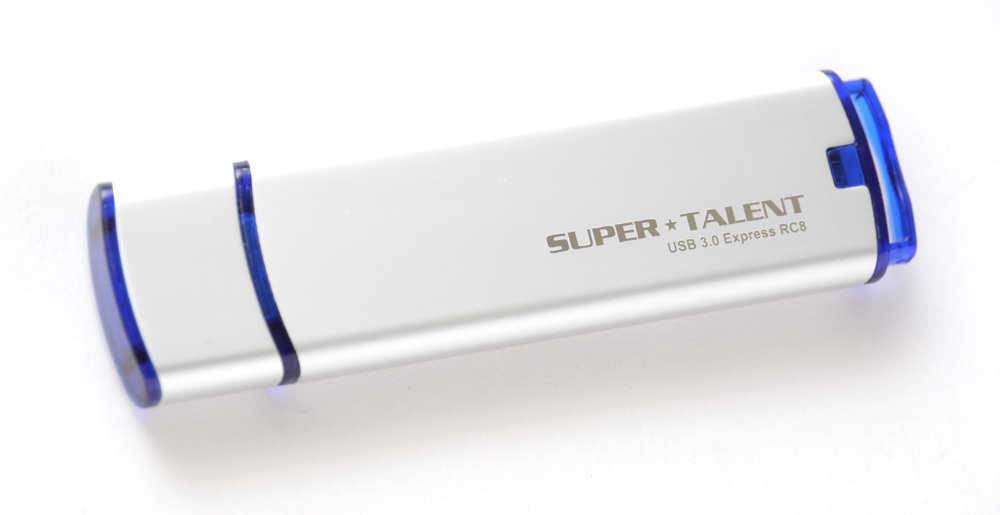 鋁質的霧面外殼,正面靠尾端處銘刻出亮面的Logo與產品名稱
http://picx.xfastest.com/elvis/Flash/SuperTalent/Express-RC8/02.jpg
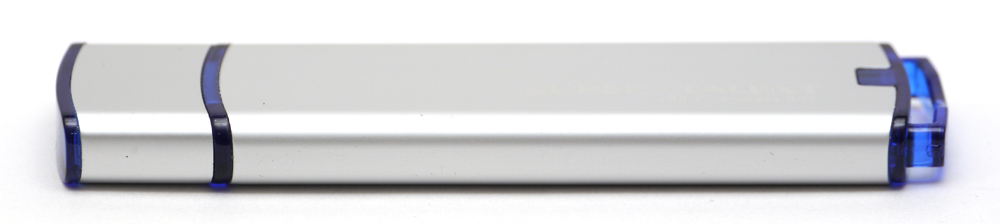 整體外殼包括保護蓋為一體成形鋁擠式鋁件,無任何接縫
保護蓋頂部
http://picx.xfastest.com/elvis/Flash/SuperTalent/Express-RC8/03.jpg
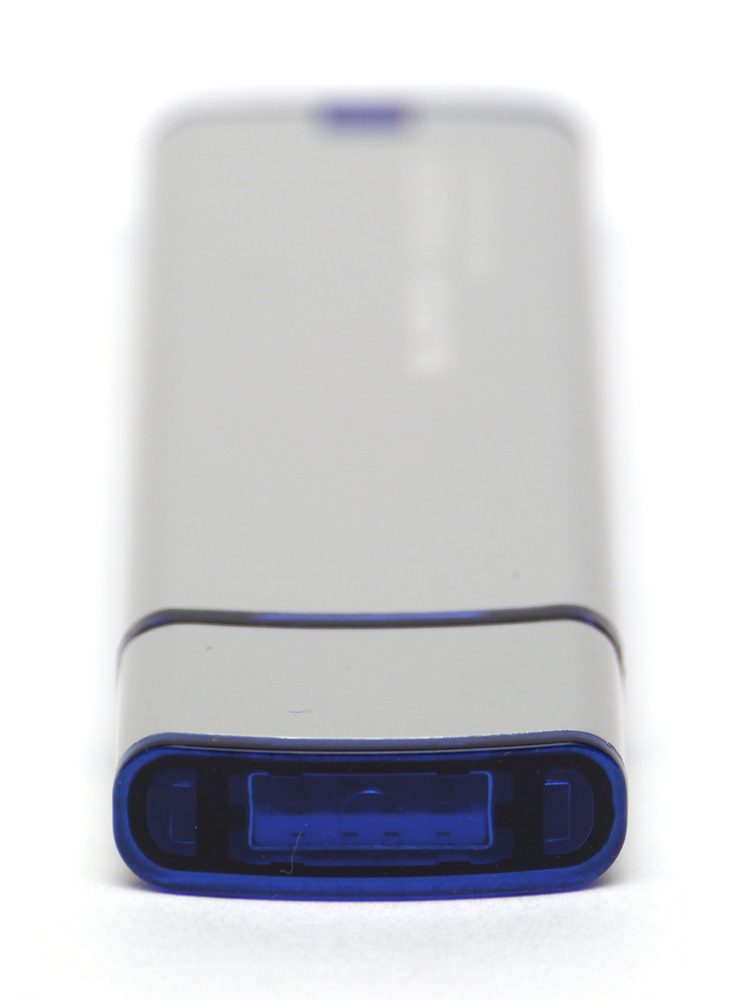
USB 3.0接頭
http://picx.xfastest.com/elvis/Flash/SuperTalent/Express-RC8/04.jpg
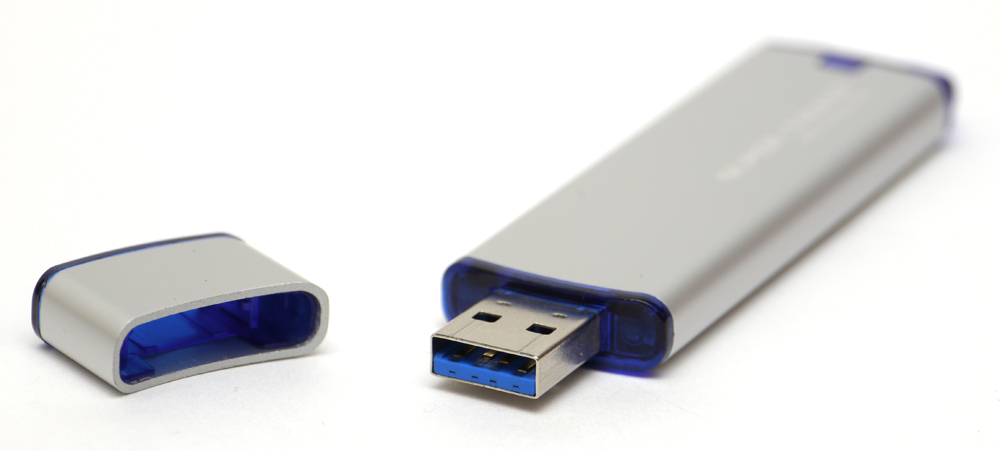
保護蓋可安插在尾端減少遺失的風險
http://picx.xfastest.com/elvis/Flash/SuperTalent/Express-RC8/05.jpg
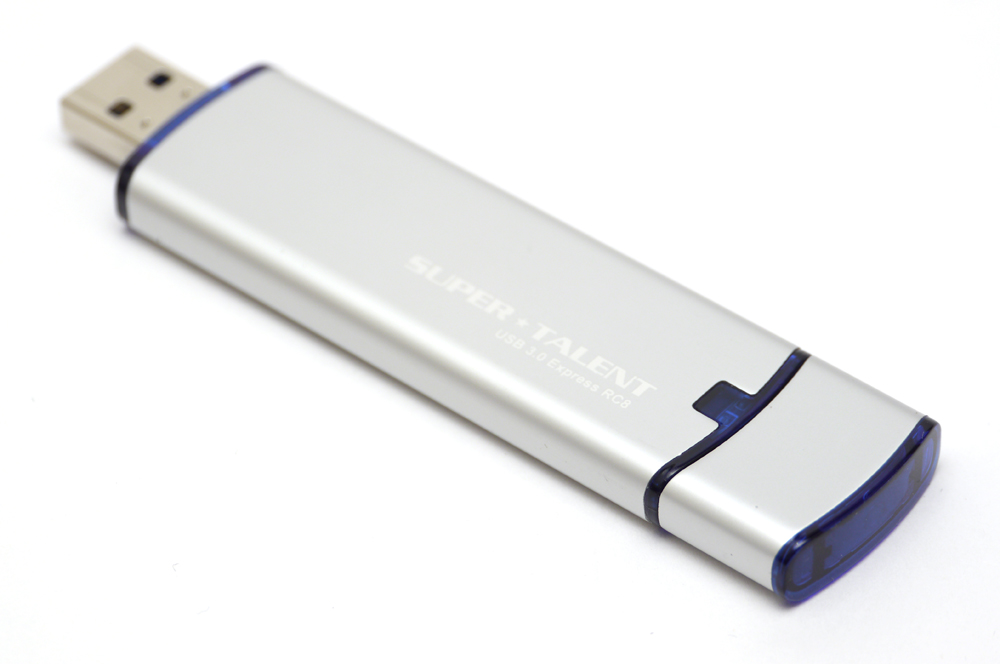
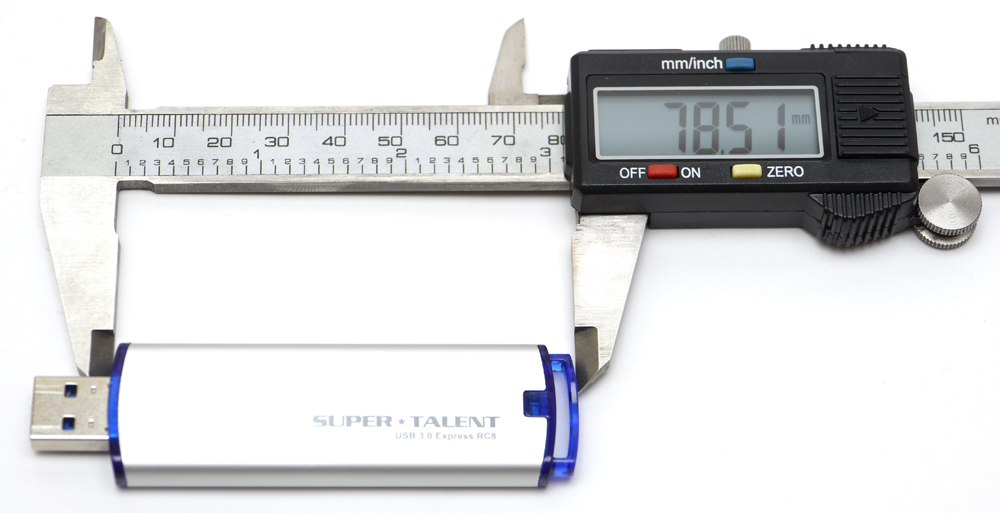
扣除USB 3.0接頭,身長約78.51mm
http://picx.xfastest.com/elvis/Flash/SuperTalent/Express-RC8/06.jpg
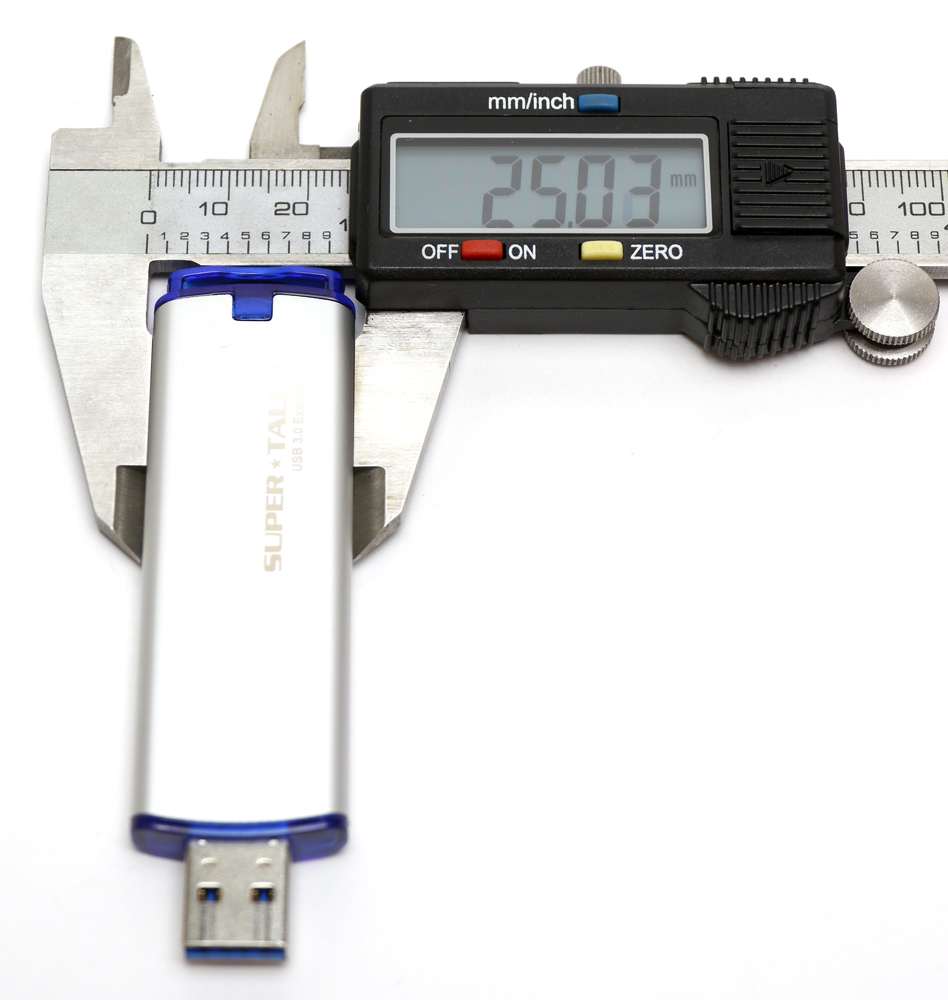
寬約25.03mm
http://picx.xfastest.com/elvis/Flash/SuperTalent/Express-RC8/07.jpg
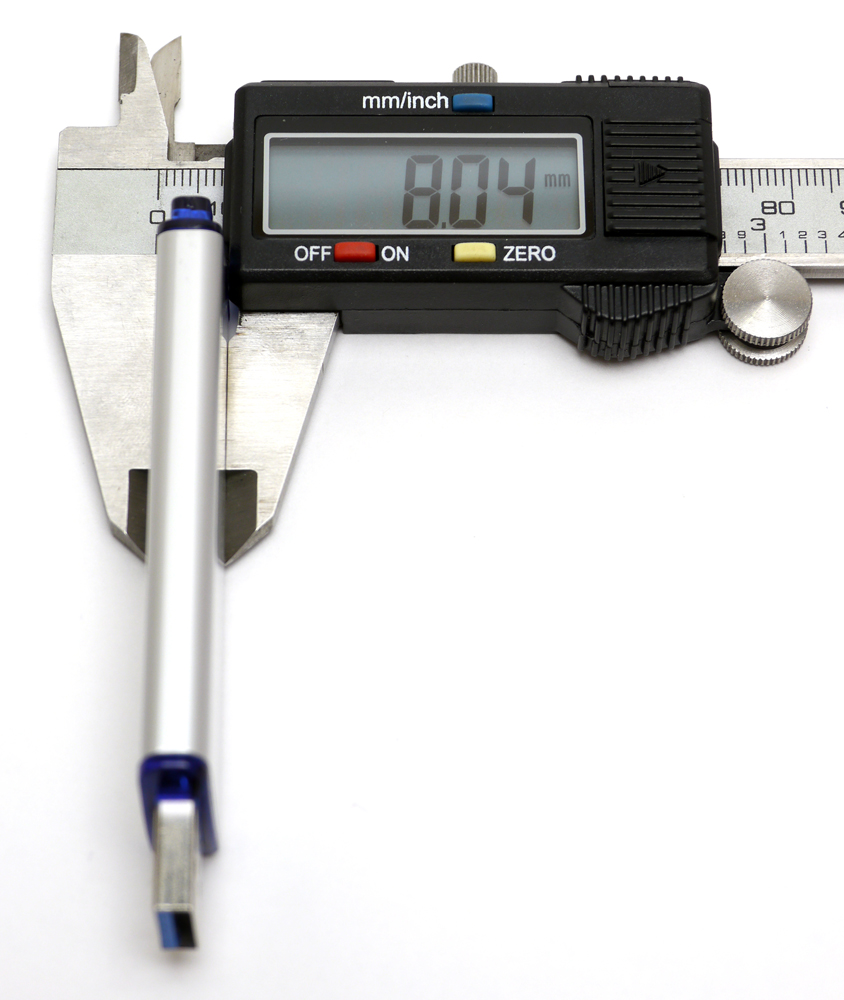
厚約8.04mm
http://picx.xfastest.com/elvis/Flash/SuperTalent/Express-RC8/08.jpg
測試平台與環境
http://picx.xfastest.com/elvis/Flash/SuperTalent/Express-RC8/09.jpg
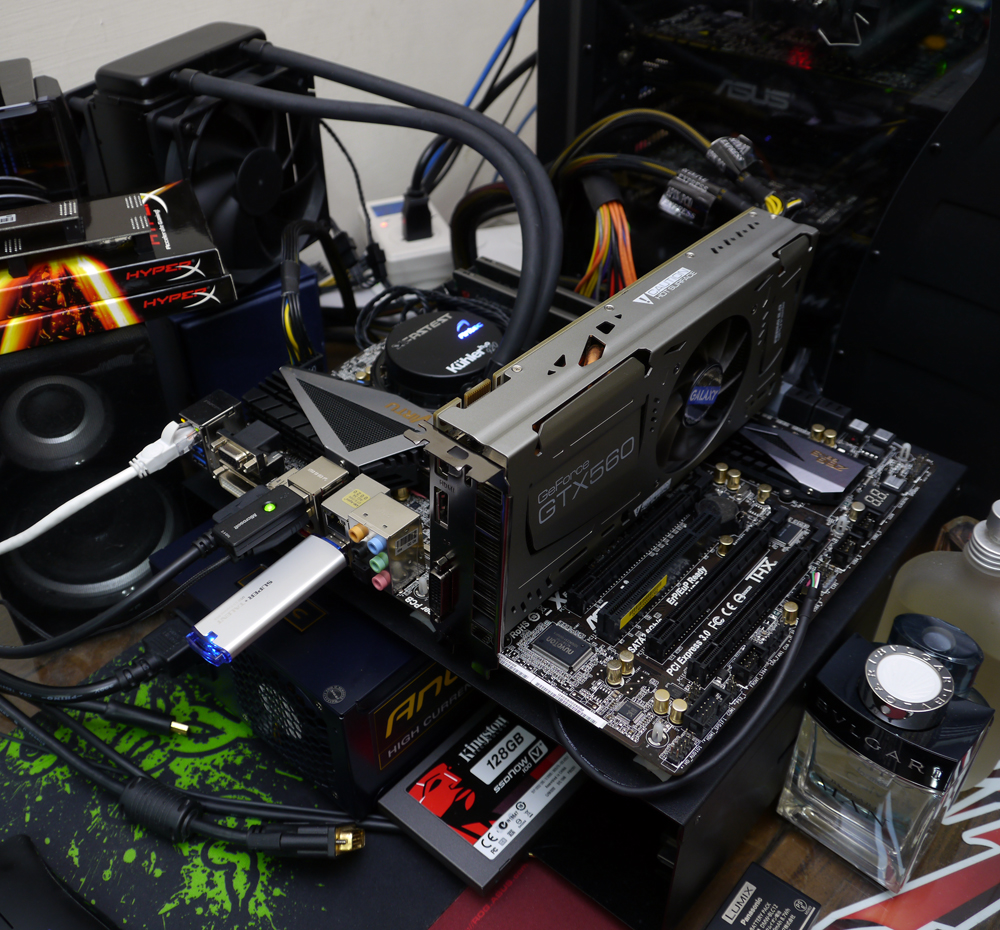 CPU: Intel Core i7-2600K @ 5.0 GHz
Cooler: Antec KÜHLER H2O 920
Thermal Compound: Antec Formula 7
MB: ASRock Z68 Extreme7 Gen3
RAM: Kingston HyperX PnP DDR3-1600
Graphic: Galaxy GTX 560 Ti White Edition @ 1000 MHz
Storage: Kingston SSD Now V+100 128GB
PSU: Antec HCP-1200W
Chassis: CoolerMaster Test Bench
Monitor: Dell U2410
上機狀況
安裝於USB孔時尾端會有藍色LED燈光,讀寫時會閃爍
http://picx.xfastest.com/elvis/Flash/SuperTalent/Express-RC8/10.jpg
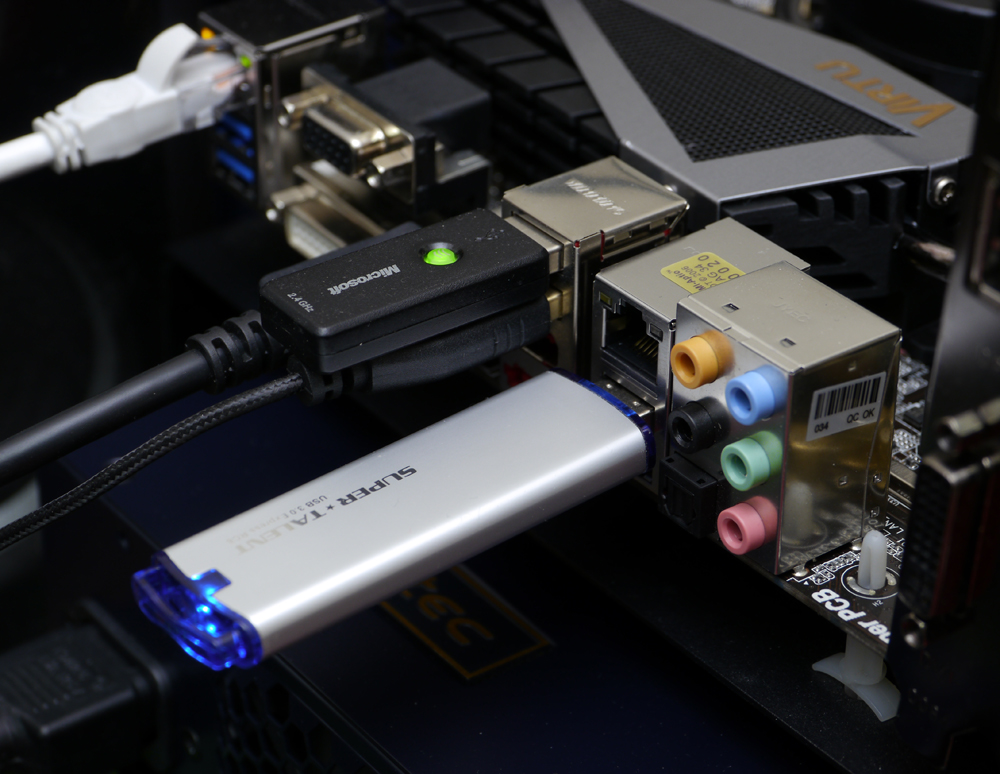 寬度略為寬大了些,安裝時要稍微注意是否會干涉其他鄰近較大型的裝置
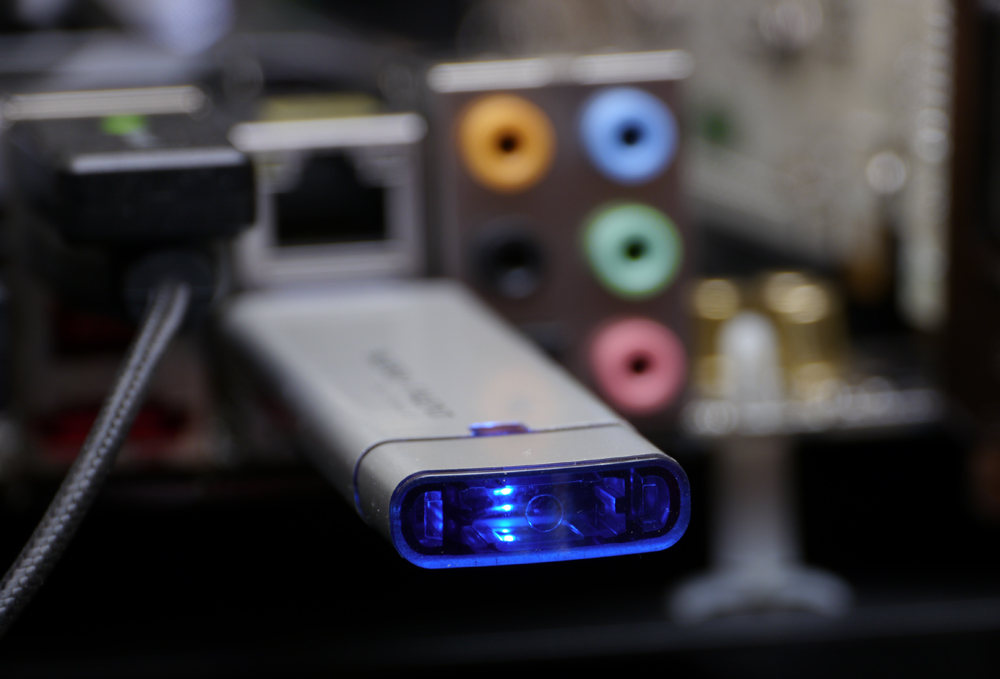
即使蓋上保護蓋也看的到藍光LED燈號喔
http://picx.xfastest.com/elvis/Flash/SuperTalent/Express-RC8/11.jpg
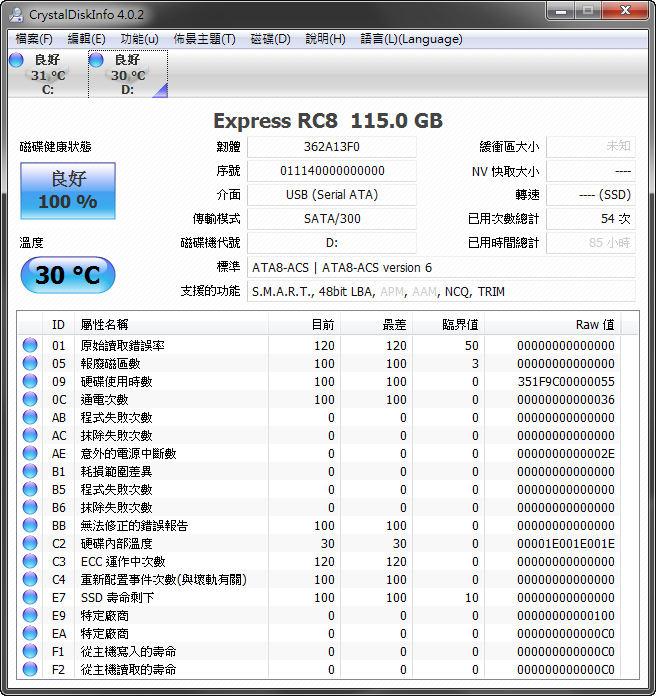
Windows將此裝置辨識為內接式磁碟而非抽取式磁碟
http://picx.xfastest.com/elvis/Flash/SuperTalent/Express-RC8/Disk.png

CrystalDiskInfo
http://picx.xfastest.com/elvis/Flash/SuperTalent/Express-RC8/CDI.png
效能測試
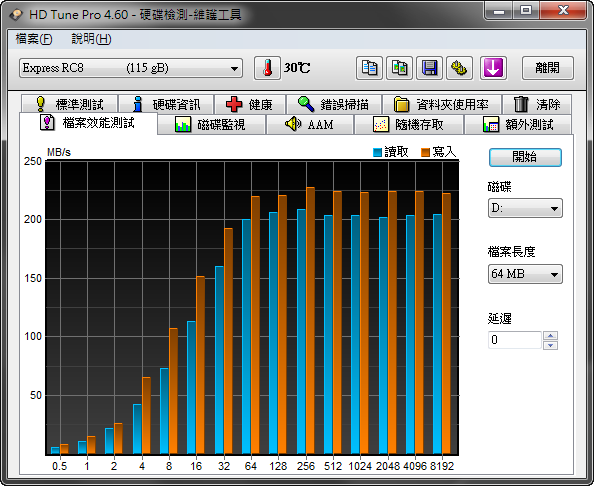
HD Tune 檔案效能測試
http://picx.xfastest.com/elvis/Flash/SuperTalent/Express-RC8/HDTune.png
AS SSD Benchmark - MB/s
http://picx.xfastest.com/elvis/Flash/SuperTalent/Express-RC8/AS01.png

AS SSD Benchmark - IOPS
http://picx.xfastest.com/elvis/Flash/SuperTalent/Express-RC8/AS02.png

AS SSD Benchmark - 檔案複製
http://picx.xfastest.com/elvis/Flash/SuperTalent/Express-RC8/AS03.png

AS SSD Benchmark - 壓縮測試
http://picx.xfastest.com/elvis/Flash/SuperTalent/Express-RC8/AS04.png

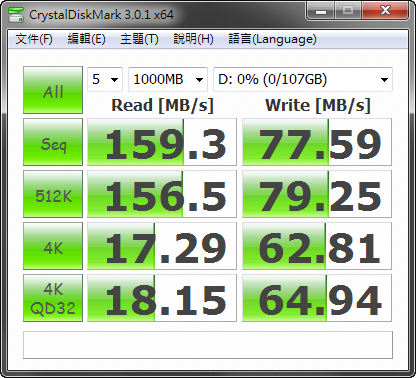
CrystalDiskMark
http://picx.xfastest.com/elvis/Flash/SuperTalent/Express-RC8/CDM.png
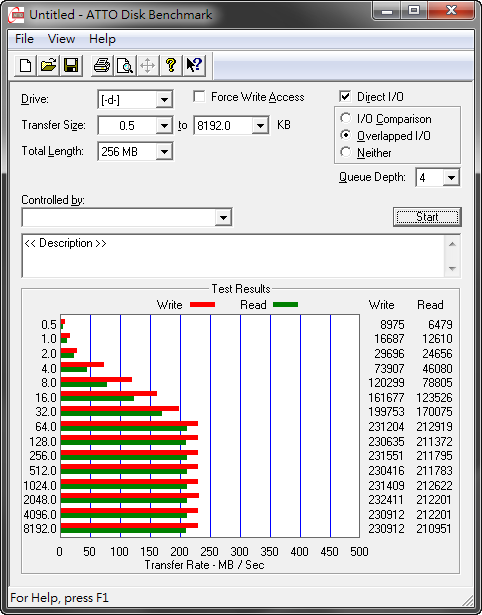
ATTO Disk Benchmark
http://picx.xfastest.com/elvis/Flash/SuperTalent/Express-RC8/ATTO.png
特別注意,這款Super Talent Express RC8隨身碟安裝
在一般外插式USB 3.0擴充卡上時,會發生以下慘狀
http://picx.xfastest.com/elvis/Flash/SuperTalent/Express-RC8/Gen1-ATTO.png
 由於大部USB 3.0分擴充卡或是部分主機板的內建USB 3.0晶片的傳輸界面
是PCI-E Gen1 x1的頻寬,無法發揮這顆隨身碟的真正實力
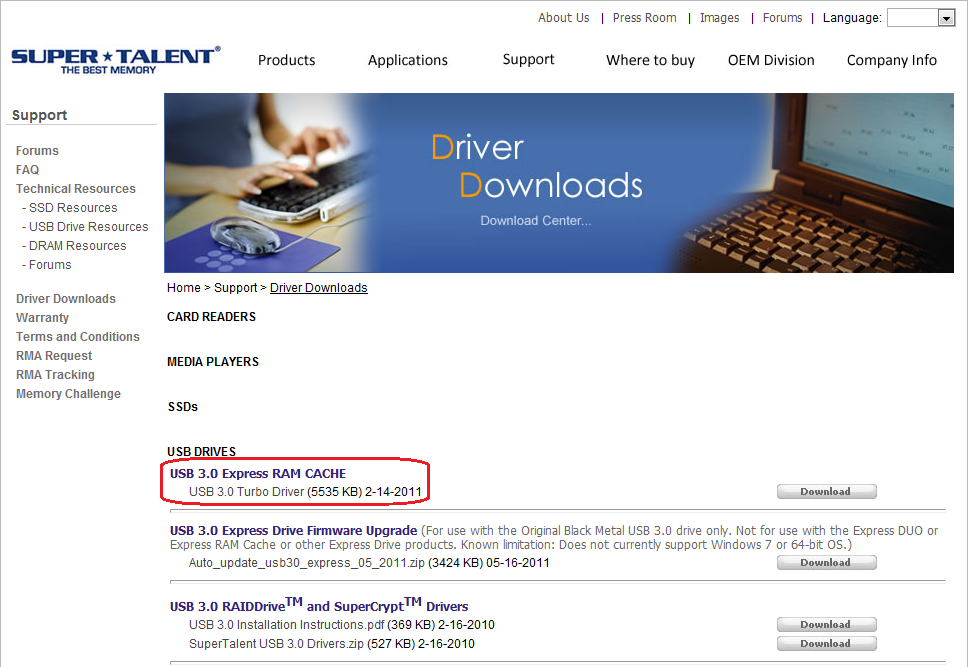
Turbo加速體驗
隨身碟於出貨時內附一款Tubo加速軟體,如果不小心格式化掉了也可至
http://www.supertalent.com/support/driver_download.php
Super Talent官方驅動頁面下載
http://picx.xfastest.com/elvis/Flash/SuperTalent/Express-RC8/Turbo00.png
安裝完後會常駐於系統匣
http://picx.xfastest.com/elvis/Flash/SuperTalent/Express-RC8/Turbo01.png
 http://picx.xfastest.com/elvis/Flash/SuperTalent/Express-RC8/Turbo02.png

安裝上Super Talent Express RC8隨身碟之後可以透過軟體介面切換傳輸模式
http://picx.xfastest.com/elvis/Flash/SuperTalent/Express-RC8/Turbo03.png
 http://picx.xfastest.com/elvis/Flash/SuperTalent/Express-RC8/Turbo04.png
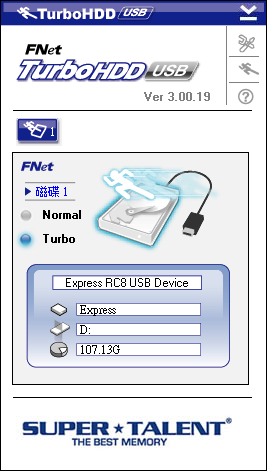 也可以直接卸載
http://picx.xfastest.com/elvis/Flash/SuperTalent/Express-RC8/Turbo05.png
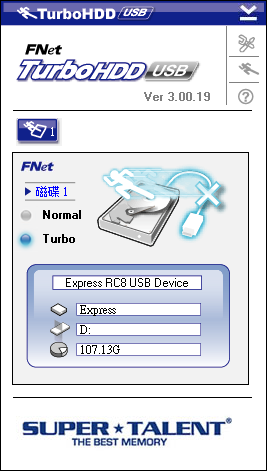
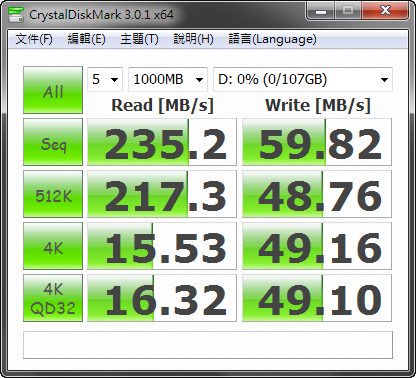
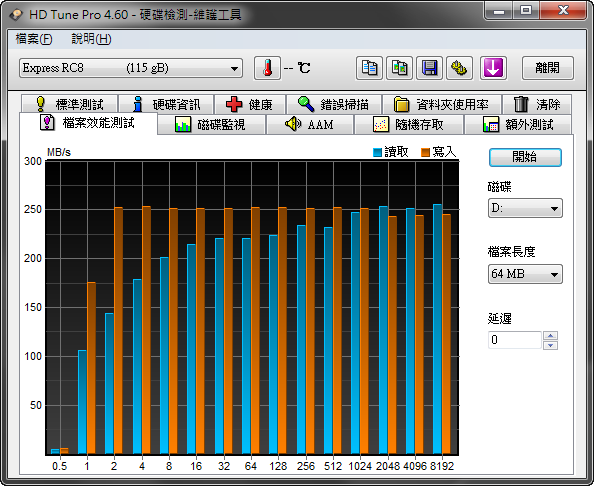
Turbo加速效能實測
CrystalDiskInfo
http://picx.xfastest.com/elvis/Flash/SuperTalent/Express-RC8/Turbo-CDM.png
HD Tune 檔案效能測試
http://picx.xfastest.com/elvis/Flash/SuperTalent/Express-RC8/Turbo-HDTune.png
AS SSD Benchmark - MB/s
http://picx.xfastest.com/elvis/Flash/SuperTalent/Express-RC8/Turbo-AS01.png

AS SSD Benchmark - IOPS
http://picx.xfastest.com/elvis/Flash/SuperTalent/Express-RC8/Turbo-AS02.png

AS SSD Benchmark - 檔案複製
http://picx.xfastest.com/elvis/Flash/SuperTalent/Express-RC8/Turbo-AS03.png

AS SSD Benchmark - 壓縮測試
http://picx.xfastest.com/elvis/Flash/SuperTalent/Express-RC8/Turbo-AS04.png
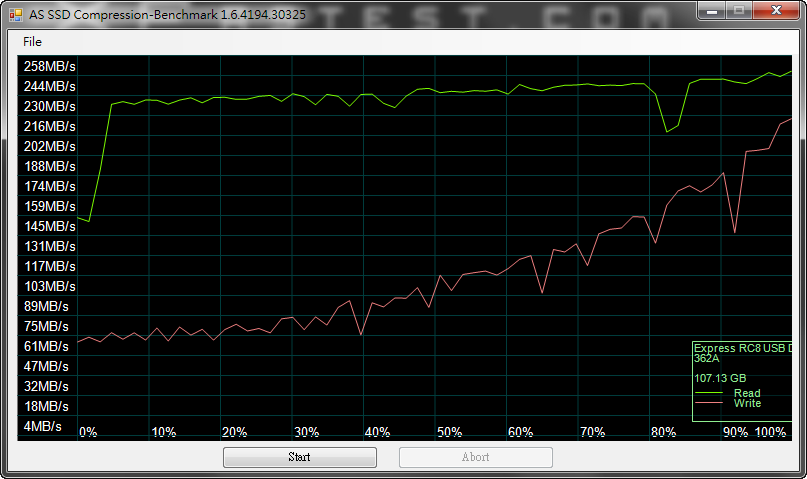
CrystalDiskMark
http://picx.xfastest.com/elvis/Flash/SuperTalent/Express-RC8/Turbo-CDM.png
ATTO Disk Benchmark
http://picx.xfastest.com/elvis/Flash/SuperTalent/Express-RC8/Turbo-ATTO.png
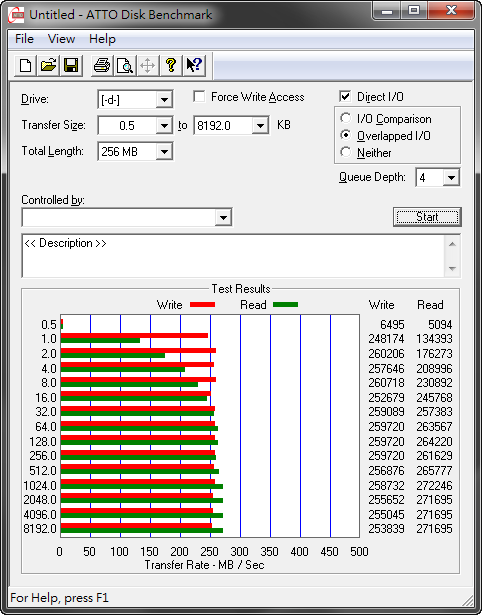
以上提供給大家做參考囉! 感謝您的收看~
--
--
作者: ChangElvis (羽神翼) 站內: PC_Shopping
標題: [開箱] Super Talent Express RC8 USB 3.0隨身碟
時間: Sun Sep 4 14:09:25 2011
加掛Turbo力拼SSD好讀版
http://www.xfastest.com/viewthread.php?tid=65146&fromuid=38227
==============================================================================
USB 3.0介面的隨身碟越來越多,傳輸速度也越來越快,
記憶體大廠Super Talent推出Express RC8超高速隨身碟,
其內採用SandForce SSD控制晶片、8通道的SSD架構、虛擬快取系統
及平均讀寫演算法設計(Wear Leveling Algorithm,可延長資料存取使用壽命),
使得整體效能達到最佳。
來看看加上Turbo功能的隨身碟傳輸表現是否可以和SSD互相匹敵!
外觀
http://picx.xfastest.com/elvis/Flash/SuperTalent/Express-RC8/01.jpg
http://picx.xfastest.com/elvis/Flash/SuperTalent/Express-RC8/02.jpg
保護蓋頂部
http://picx.xfastest.com/elvis/Flash/SuperTalent/Express-RC8/03.jpg
USB 3.0接頭
http://picx.xfastest.com/elvis/Flash/SuperTalent/Express-RC8/04.jpg
保護蓋可安插在尾端減少遺失的風險
http://picx.xfastest.com/elvis/Flash/SuperTalent/Express-RC8/05.jpg
扣除USB 3.0接頭,身長約78.51mm
http://picx.xfastest.com/elvis/Flash/SuperTalent/Express-RC8/06.jpg
寬約25.03mm
http://picx.xfastest.com/elvis/Flash/SuperTalent/Express-RC8/07.jpg
厚約8.04mm
http://picx.xfastest.com/elvis/Flash/SuperTalent/Express-RC8/08.jpg
測試平台與環境
http://picx.xfastest.com/elvis/Flash/SuperTalent/Express-RC8/09.jpg
Cooler: Antec KÜHLER H2O 920
Thermal Compound: Antec Formula 7
MB: ASRock Z68 Extreme7 Gen3
RAM: Kingston HyperX PnP DDR3-1600
Graphic: Galaxy GTX 560 Ti White Edition @ 1000 MHz
Storage: Kingston SSD Now V+100 128GB
PSU: Antec HCP-1200W
Chassis: CoolerMaster Test Bench
Monitor: Dell U2410
上機狀況
安裝於USB孔時尾端會有藍色LED燈光,讀寫時會閃爍
http://picx.xfastest.com/elvis/Flash/SuperTalent/Express-RC8/10.jpg
即使蓋上保護蓋也看的到藍光LED燈號喔
http://picx.xfastest.com/elvis/Flash/SuperTalent/Express-RC8/11.jpg
Windows將此裝置辨識為內接式磁碟而非抽取式磁碟
http://picx.xfastest.com/elvis/Flash/SuperTalent/Express-RC8/Disk.png
CrystalDiskInfo
http://picx.xfastest.com/elvis/Flash/SuperTalent/Express-RC8/CDI.png
效能測試
HD Tune 檔案效能測試
http://picx.xfastest.com/elvis/Flash/SuperTalent/Express-RC8/HDTune.png
AS SSD Benchmark - MB/s
http://picx.xfastest.com/elvis/Flash/SuperTalent/Express-RC8/AS01.png
AS SSD Benchmark - IOPS
http://picx.xfastest.com/elvis/Flash/SuperTalent/Express-RC8/AS02.png
AS SSD Benchmark - 檔案複製
http://picx.xfastest.com/elvis/Flash/SuperTalent/Express-RC8/AS03.png
AS SSD Benchmark - 壓縮測試
http://picx.xfastest.com/elvis/Flash/SuperTalent/Express-RC8/AS04.png
CrystalDiskMark
http://picx.xfastest.com/elvis/Flash/SuperTalent/Express-RC8/CDM.png
ATTO Disk Benchmark
http://picx.xfastest.com/elvis/Flash/SuperTalent/Express-RC8/ATTO.png
特別注意,這款Super Talent Express RC8隨身碟安裝
在一般外插式USB 3.0擴充卡上時,會發生以下慘狀
http://picx.xfastest.com/elvis/Flash/SuperTalent/Express-RC8/Gen1-ATTO.png
是PCI-E Gen1 x1的頻寬,無法發揮這顆隨身碟的真正實力
Turbo加速體驗
隨身碟於出貨時內附一款Tubo加速軟體,如果不小心格式化掉了也可至
http://www.supertalent.com/support/driver_download.php
Super Talent官方驅動頁面下載
http://picx.xfastest.com/elvis/Flash/SuperTalent/Express-RC8/Turbo00.png
安裝完後會常駐於系統匣
http://picx.xfastest.com/elvis/Flash/SuperTalent/Express-RC8/Turbo01.png
安裝上Super Talent Express RC8隨身碟之後可以透過軟體介面切換傳輸模式
http://picx.xfastest.com/elvis/Flash/SuperTalent/Express-RC8/Turbo03.png
http://picx.xfastest.com/elvis/Flash/SuperTalent/Express-RC8/Turbo05.png
Turbo加速效能實測
CrystalDiskInfo
http://picx.xfastest.com/elvis/Flash/SuperTalent/Express-RC8/Turbo-CDM.png
HD Tune 檔案效能測試
http://picx.xfastest.com/elvis/Flash/SuperTalent/Express-RC8/Turbo-HDTune.png
AS SSD Benchmark - MB/s
http://picx.xfastest.com/elvis/Flash/SuperTalent/Express-RC8/Turbo-AS01.png
AS SSD Benchmark - IOPS
http://picx.xfastest.com/elvis/Flash/SuperTalent/Express-RC8/Turbo-AS02.png
AS SSD Benchmark - 檔案複製
http://picx.xfastest.com/elvis/Flash/SuperTalent/Express-RC8/Turbo-AS03.png
AS SSD Benchmark - 壓縮測試
http://picx.xfastest.com/elvis/Flash/SuperTalent/Express-RC8/Turbo-AS04.png
CrystalDiskMark
http://picx.xfastest.com/elvis/Flash/SuperTalent/Express-RC8/Turbo-CDM.png
ATTO Disk Benchmark
http://picx.xfastest.com/elvis/Flash/SuperTalent/Express-RC8/Turbo-ATTO.png
以上提供給大家做參考囉! 感謝您的收看~
--
→ herculex:前幾個月有人打死都不相信usb3.0會多快普及06/26 13:33
--
All Comments